ONE CAT. READY FOR YOUR DESKTOP.
Everything you need for a little desktop companion. A tiny pixel cat that follows your workday, reacts to your activity, and makes your Mac feel a little more alive.
- ▸Cursor-following movement.
- ▸Dock wandering and naps.
- ▸Live AI coding-agent activity.
- ▸Apple Music and Spotify integration.
- ▸Jokes, reminders and Pomodoro timers.
- ▸Customisable cat size, speed and name.
LOOK WHAT MEOWY CAN DO.
One tiny cat. A surprising number of things to do. Here is a closer look at everything your new desktop companion can do.
CURSOR COMPANION
Meowy follows your mouse around the desktop, walking in the right direction and relaxing when it catches up.
DOCK LIFE
Let Meowy wander along your Dock, explore, scratch around and take occasional naps.
PIXEL ANIMATIONS
Watch Meowy walk, sleep, scratch, yawn and react through a collection of adorable pixel-art animations.
AI AGENT MONITOR
See what your AI coding assistants are doing without constantly checking their windows.
NOW PLAYING
Meowy can display your currently playing music from Apple Music or Spotify.
JOKES & QUOTES
Get a little entertainment with jokes, advice and quotes while Meowy hangs out on your Dock.
POMODORO TIMER
Start a focus session and let Meowy keep track of your countdown.
SMART REMINDERS
Set a reminder and let Meowy jump in with a floating notification when it is time.
MULTI-SCREEN DESKTOP
Meowy can move across supported display arrangements while respecting screen boundaries.
SMALL CAT. BIG PERSONALITY.
CUSTOM NAMING
Give your cat a name from the menu bar.
MULTIPLE ANIMATIONS
Idle, alert, scratching, sleeping, walking in eight directions.
REDUCED MOTION
Respects macOS reduced-motion preferences where supported.
PERSISTENT PREFERENCES
Mode, scale, speed and toggles are saved locally.
MULTI-SCREEN AWARE
Handles supported display arrangements and boundaries.
ADJUSTABLE SCALE
Resize and change walking speed to taste.
YOUR CAT.
YOUR RULES.
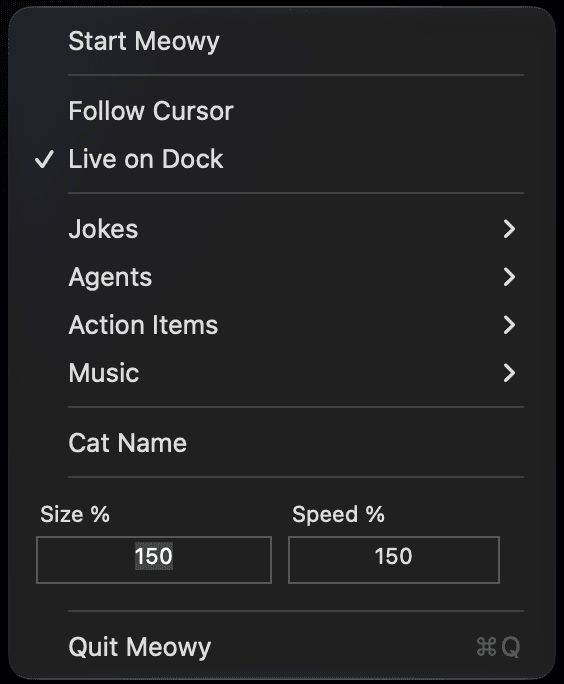
Make Meowy feel right at home on your desktop. Choose how it moves, what it watches, and when it wants to interrupt you.
- ▸Follow your cursor or explore your Dock.
- ▸Give your cat a custom name.
- ▸Adjust its size and walking speed.
- ▸Choose which AI coding agents to monitor.
- ▸Connect Apple Music or Spotify.
- ▸Control jokes, reminders and Pomodoro timers.
A FEW THINGS YOU MIGHT WONDER.
Meowy is a small native macOS menu-bar app that places a playful pixel-art cat on your desktop. It can follow your cursor or wander along the Dock, and surface tiny bubbles for agent status, music, reminders, jokes and focus timers.
macOS 13 or later. Meowy is a Swift 5 AppKit application with no Windows or Linux version.
Yes. Meowy is aware of your display arrangement and respects screen boundaries when moving between supported displays.
Claude Code, OpenAI Codex and Cursor. Meowy shows activity and completion status; it does not replace, control, or generate code for those tools.
Yes. When music monitoring and the relevant source are enabled, Meowy shows the current track and artist in a small floating bubble.
Yes. You can give Meowy a custom name from the menu-bar preferences, along with size and walking speed.
Yes. Switch between Follow Cursor and Live on Dock at any time from the menu bar.
Yes. Jokes, reminders, music, agent monitoring and other features can be toggled individually from Meowy's menu-bar settings.
Yes. Preferences such as mode, scale, speed, cat name and feature toggles are persisted locally with UserDefaults.
The project's source is published on GitHub at github.com/arman0824/Meowy. See the repository for licensing details.

Meowy
A pixel cat that lives on your desktop.